Get in touch
Learn how to use Flutter and Dio for professional app development. Discover expert tips for robust networking and SEO strategies to boost your Flutter web app’s Google rankings.

In the fast-evolving world of mobile and web app development, Flutter has emerged as a game-changer, enabling developers to create high-performance, cross-platform applications from a single codebase. When it comes to handling HTTP requests efficiently, Dio, a powerful HTTP client for Dart, is the go-to choice for professional Flutter developers. This blog explores how to use Flutter and Dio professionally, with a focus on building robust applications and optimizing for SEO to achieve better Google rankings.
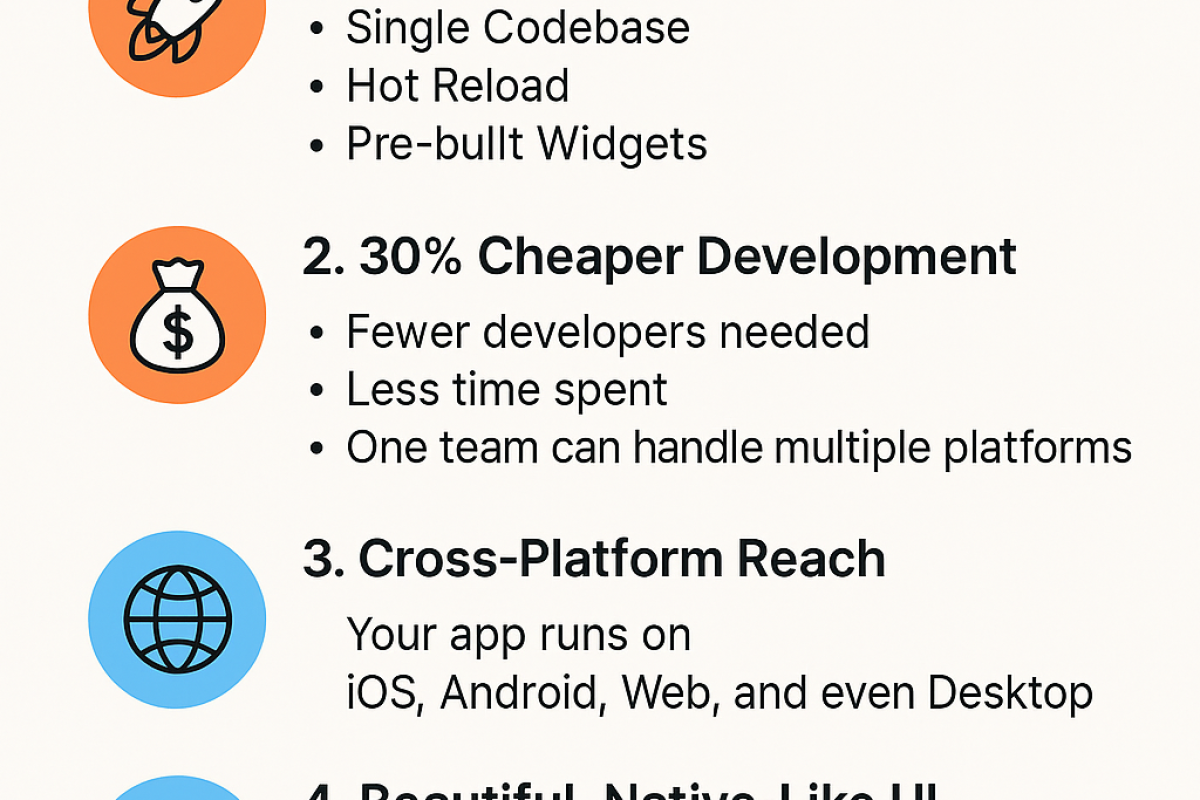
Flutter, developed by Google, is an open-source UI toolkit that allows developers to build natively compiled applications for mobile, web, and desktop. Its key advantages include:
Dio, on the other hand, is a feature-rich HTTP client that simplifies networking tasks in Flutter. Unlike the default http package, Dio offers advanced features like:
Together, Flutter and Dio form a powerful combination for building scalable, efficient, and professional-grade applications. However, to maximize visibility, especially for Flutter web apps, SEO optimization is critical. Let’s dive into how to use Dio professionally and boost your app’s Google ranking.
To get started with Dio in Flutter, follow these steps to set up a professional-grade networking layer.
Add the Dio package to your pubspec.yaml file:
dependencies:
  dio: ^5.7.0
Run flutter pub get to install the package.
For professional development, encapsulate Dio’s functionality in a dedicated service class to ensure reusability, maintainability, and scalability. Below is an example of a well-structured ApiService class:
import 'package:dio/dio.dart';

class ApiService {
  final Dio _dio;

  ApiService()
      : _dio = Dio(
          BaseOptions(
            baseUrl: 'https://api.example.com/',
            connectTimeout: const Duration(seconds: 10),
            receiveTimeout: const Duration(seconds: 10),
            headers: {
              'Content-Type': 'application/json',
              'Accept': 'application/json',
            },
          ),
        ) {
    // Add interceptors for logging, authentication, or retries
    _dio.interceptors.add(
      InterceptorsWrapper(
        onRequest: (options, handler) {
          print('Request: ${options.method} ${options.uri}');
          return handler.next(options);
        },
        onResponse: (response, handler) {
          print('Response: ${response.statusCode}');
          return handler.next(response);
        },
        onError: (DioException e, handler) {
          print('Error: ${e.message}');
          return handler.next(e);
        },
      ),
    );
  }

  // Example GET request
  Future<List<dynamic>> fetchData(String endpoint) async {
    try {
      final response = await _dio.get(endpoint);
      return response.data;
    } on DioException catch (e) {
      throw Exception('Failed to fetch data: ${e.message}');
    }
  }

  // Example POST request
  Future<void> postData(String endpoint, Map<String, dynamic> data) async {
    try {
      await _dio.post(endpoint, data: data);
    } on DioException catch (e) {
      throw Exception('Failed to post data: ${e.message}');
    }
  }
}
This ApiService class:
Use the ApiService in a Flutter widget to fetch and display data. Here’s an example using a FutureBuilder:
import 'package:flutter/material.dart';
import 'api_service.dart';

class DataListScreen extends StatefulWidget {
  const DataListScreen({super.key});

  @override
  State<DataListScreen> createState() => _DataListScreenState();
}

class _DataListScreenState extends State<DataListScreen> {
  late Future<List<dynamic>> _data;

  @override
  void initState() {
    super.initState();
    _data = ApiService().fetchData('/posts');
  }

  @override
  Widget build(BuildContext context) {
    return Scaffold(
      appBar: AppBar(title: const Text('Dio Example')),
      body: FutureBuilder<List<dynamic>>(
        future: _data,
        builder: (context, snapshot) {
          if (snapshot.connectionState == ConnectionState.waiting) {
            return const Center(child: CircularProgressIndicator());
          }
          if (snapshot.hasError) {
            return Center(child: Text('Error: ${snapshot.error}'));
          }
          final data = snapshot.data!;
          return ListView.builder(
            itemCount: data.length,
            itemBuilder: (context, index) {
              final item = data[index];
              return ListTile(
                title: Text(item['title'] ?? 'No Title'),
                subtitle: Text(item['body'] ?? 'No Body'),
              );
            },
          );
        },
      ),
    );
  }
}
This example fetches data from an API and displays it in a ListView, with proper error handling and loading states.
To use Dio like a pro, follow these best practices:
Interceptors for Authentication: Add tokens or API keys to requests dynamically.
_dio.interceptors.add(
  InterceptorsWrapper(
    onRequest: (options, handler) {
      options.headers['Authorization'] = 'Bearer your_token_here';
      return handler.next(options);
    },
  ),
);
Request Cancellation: Cancel redundant requests to optimize performance.
final cancelToken = CancelToken();
_dio.get('/data', cancelToken: cancelToken);
// Cancel the request if needed
cancelToken.cancel('Request cancelled');
File Uploads: Use Dio for multipart file uploads with progress tracking.
final formData = FormData.fromMap({
  'file': await MultipartFile.fromFile(filePath, filename: 'upload.jpg'),
});
await _dio.post('/upload', data: formData, onSendProgress: (sent, total) {
  print('Upload progress: ${(sent / total * 100).toStringAsFixed(2)}%');
});
dio_retry.DioException to handle specific error cases like timeouts or 404 errors.Flutter web apps face SEO challenges due to their reliance on client-side rendering (CSR) and canvas-based rendering, which search engines struggle to crawl. To make your Flutter web app SEO-friendly and improve Google rankings, implement these strategies:
flutter_html_renderer. This ensures search engines can index critical content.seo PackageUse the seo package to add meta tags for better indexing. Add it to your pubspec.yaml:
dependencies:
  seo: ^0.4.0
Configure it in main.dart:
import 'package:seo/seo.dart';

void main() {
  usePathUrlStrategy(); // Ensure clean URLs for SEO
  runApp(const MyApp());
}

class MyApp extends StatelessWidget {
  const MyApp({super.key});

  @override
  Widget build(BuildContext context) {
    return SeoController(
      enabled: true,
      tree: WidgetTree(context: context),
      child: MaterialApp(
        home: Scaffold(
          body: Seo.head(
            tags: [
              MetaTag(name: 'title', content: 'My Flutter App'),
              MetaTag(name: 'description', content: 'A professional Flutter app with Dio for networking.'),
              LinkTag(rel: 'canonical', href: 'https://www.example.com'),
            ],
            child: const DataListScreen(),
          ),
        ),
      ),
    );
  }
}
This adds essential meta tags like title, description, and canonical to improve crawlability.
Google prioritizes fast-loading pages. Optimize your Flutter web app by:
Replace hash-based navigation (/#/page) with clean URLs using usePathUrlStrategy(). This makes pages more indexable and user-friendly.
Add schema.org structured data using JSON-LD to provide context to search engines. Manually inject it into your index.html:
<script type=application/ld+json>
{
  "@context": "https://schema.org",
  "@type": "WebSite",
  "name": "My Flutter App",
  "url": "https://www.example.com"
}
</script>
Create high-quality content (e.g., blogs, tutorials) to attract backlinks from authoritative sites. Share your app on platforms like Medium, Dev.to, or Reddit to drive traffic and improve domain authority.
Use tools like Google Search Console and Google Analytics 4 to track indexing status, organic traffic, and keyword rankings. Adjust your strategy based on performance data.
To ensure your Flutter web app ranks well on Google:
Semantics) to improve accessibility and SEO.Using Dio professionally ensures robust networking, which is critical for real-world apps like e-commerce platforms or social media clients. Meanwhile, SEO optimization makes your Flutter web app discoverable, driving organic traffic and increasing user engagement. By combining Dio’s advanced networking capabilities with SEO best practices, you can build apps that are both functional and visible.
Flutter and Dio are a powerful duo for building professional, cross-platform applications. By structuring your Dio implementation with a service class, using interceptors, and handling errors effectively, you can create a scalable networking layer. For SEO, focus on server-side rendering, meta tags, and performance optimization to boost your app’s Google rankings. With these strategies, your Flutter web app can achieve both technical excellence and high visibility.
Ready to take your Flutter app to the next level? Start implementing these techniques today and watch your app climb the search engine ranks!
For more insights on Flutter development and SEO, check out resources like Flutter’s official documentation and the Dio package on pub.dev.
Your email address will not be published. Required fields are marked *